1. netwox使用说明
netwox可以创建任意的TCP\UDP和IP数据报文,以实现网络欺骗。
1.1. 下载及安装
下载地址: https://sourceforge.net/projects/ntwox/
在解压的文件夹中找到对应的应用程序文件 installwindows.exe。双击该文件进行安装。
启动netwox,可以看到菜单栏
0:退出 netwox 工具。
3:搜索工具,用来搜索与指定信息相关的模块。
4:显示指定模块的帮助信息。
5:在命令行中输入指定模块的参数选项并运行。
6:从键盘输入指定模块的参数选项并运行。
a:显示信息。
b:显示网络协议下相关的模块。
c:显示应用程序协议下相关的模块。
d:显示与嗅探数据包相关的模块。
e:显示与创建和发送数据包相关的模块。
f:显示与进行数据包记录相关的模块。
g:显示与客户端相关的模块。
h:显示与服务器相关的模块。
i:显示与检测主机连通性相关的模块。
j:显示与路由跟踪相关的模块。
k:显示与扫描计算机和端口相关的模块。
l:显示与审计相关的模块。
m:显示与暴力破解相关的模块。
n:显示与远程管理相关的模块。
o:显示其他模块。
使用快捷键 e,查看创建和发送数据包的相关模块
Select a node (key in 03456abcdefghijklmno): e

############# spoof (create and send packets) ##############
#创建和发送数据包模块
0 - leave netwox
1 - go to main menu
2 - go to previous menu
3 - search tools
4 - display help of one tool
5 - run a tool selecting parameters on command line
6 - run a tool selecting parameters from keyboard
a + Ethernet spoof
b + IP spoof         # 创建ip 数据包 快捷键b,即可创建
c + UDP spoof		# 创建UDP 数据包 快捷键c
d + TCP spoof		# 创建TCP 数据包 快捷键d
e + ICMP spoof		# 创建ICMP 数据包 快捷键e
f + ARP spoof		# 创建ARP 数据包 快捷键f
使用搜索功能
在主菜单输入3,进入搜索选项,比如我们搜索UDP关键字;
可以从提示信息看出,有关UDP的模块ID 是35-184;
假如我们要使用35号模块即:
35:Spoof EthernetIp4Udp packet;我们在主菜单输入5,进入命令运行模式
然后输入刚刚查到的ID:35,就进入了命令模式,
######################## MAIN MENU #########################
 0 - leave netwox
 3 - search tools
 4 - display help of one tool
 5 - run a tool selecting parameters on command line
 6 - run a tool selecting parameters from keyboard
 a + information
 b + network protocol
 c + application protocol
 d + sniff (capture network packets)
 e + spoof (create and send packets)
 f + record (file containing captured packets)
 g + client
 h + server
 i + ping (check if a computer if reachable)
 j + traceroute (obtain list of gateways)
 k + scan (computer and port discovery)
 l + network audit
 m + brute force (check if passwords are weak)
 n + remote administration
 o + tools not related to network
Select a node (key in 03456abcdefghijklmno): 3    # 1.输入3进入搜索模式
Enter search string: udp                          # 2.输入udp

############ list of tools containing this text ############
Tools containing "udp":
  35:Spoof EthernetIp4Udp packet
  39:Spoof Ip4Udp packet
  53:Ping UDP
  54:Ping UDP (EthIp spoof)
  61:Traceroute UDP
  62:Traceroute UDP (EthIp spoof)
  69:Scan UDP
  70:Scan UDP (EthIp spoof)
  88:UDP client
  90:UDP server
  92:UDP server multiclients
  141:Spoof EthernetIp6Udp packet
  145:Spoof Ip6Udp packet
  157:Network performance measurement : UDP server
  158:Network performance measurement : UDP client
  184:UDP relay
Press any key to continue                   # 3.这里按任意键返回到主菜单

######################## MAIN MENU #########################
 0 - leave netwox
 3 - search tools
 4 - display help of one tool
 5 - run a tool selecting parameters on command line
 6 - run a tool selecting parameters from keyboard
 a + information
 b + network protocol
 c + application protocol
 d + sniff (capture network packets)
 e + spoof (create and send packets)
 f + record (file containing captured packets)
 g + client
 h + server
 i + ping (check if a computer if reachable)
 j + traceroute (obtain list of gateways)
 k + scan (computer and port discovery)
 l + network audit
 m + brute force (check if passwords are weak)
 n + remote administration
 o + tools not related to network
Select a node (key in 03456abcdefghijklmno): 5   # 4.输入5 运行模块
Select tool number (between 1 and 223)> 35       # 5.输入刚刚查询的模块ID 35

################## running tool number 35 ##################
Title: Spoof EthernetIp4Udp packet
+------------------------------------------------------------------------+
| This tool sends a fake packet on the network.                          |
| Each parameter name should be self explaining.                         |
|                                                                        |
| This tool may need to be run with admin privilege in order to spoof.   |
+------------------------------------------------------------------------+
Synonyms: frame, hping, mac, send
Usage: netwox 35 [-d device] [-a eth] [-b eth] [-c uint32] [-e uint32] [-f|+f] [-g|+g] [-h|+h] [-i uint32] [-j uint32] [-k uint32] [-l ip] [-m ip] [-n ip4opts] [-o port] [-p port] [-q mixed_data] [-r uint32] [-s uint32] [-t uint32] [-u uint32] [-v uint32] [-w uint32]
Parameters:
 -d|--device device             device for spoof {Eth0}
 -a|--eth-src eth               Ethernet src {00:E0:4C:36:02:4E}
 -b|--eth-dst eth               Ethernet dst {0:8:9:a:b:c}
 -c|--ip4-tos uint32            IP4 tos {0}
 -e|--ip4-id uint32             IP4 id (rand if unset) {0}
 -f|--ip4-reserved|+f|--no-ip4-reserved IP4 reserved
 -g|--ip4-dontfrag|+g|--no-ip4-dontfrag IP4 dontfrag
 -h|--ip4-morefrag|+h|--no-ip4-morefrag IP4 morefrag
 -i|--ip4-offsetfrag uint32     IP4 offsetfrag {0}
 -j|--ip4-ttl uint32            IP4 ttl {0}
 -k|--ip4-protocol uint32       IP4 protocol {0}
 -l|--ip4-src ip                IP4 src {10.0.0.10}
 -m|--ip4-dst ip                IP4 dst {5.6.7.8}
 -n|--ip4-opt ip4opts           IPv4 options
 -o|--udp-src port              UDP src {1234}
 -p|--udp-dst port              UDP dst {80}
 -q|--udp-data mixed_data       mixed data
 -r|--eth-type uint32           Ethernet type {2048}
 -s|--ip4-ihl uint32            IP4 ihl {5}
 -t|--ip4-totlen uint32         IP4 totlen {0}
 -u|--ip4-checksum uint32       IP4 checksum {0}
 -v|--udp-len uint32            UDP length {0}
 -w|--udp-checksum uint32       UDP checksum {0}
Example: netwox 35
Enter optional tool parameters and press Return key.
netwox 35  #6.接着可以根据上面的提示输入命令测试udp包
接着我们输入提示的参数,即可完成发送。
源MAC:
00:e0:4c:36:02:4e源ip:
10.0.0.10目标ip:
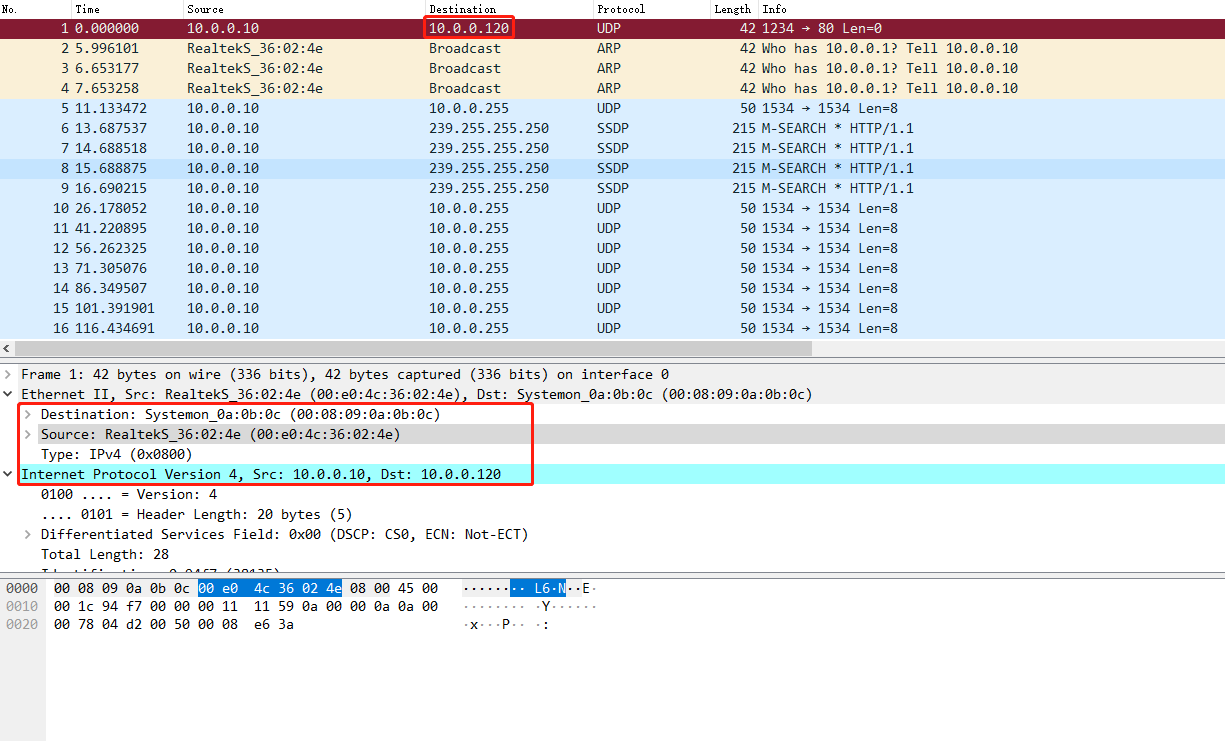
10.0.0.120netwox 35 -a 00:e0:4c:36:02:4e -l 10.0.0.10 -m 10.0.0.120 Ethernet________________________________________________________. | 00:E0:4C:36:02:4E->00:08:09:0A:0B:0C type:0x0800 | |_______________________________________________________________| IP______________________________________________________________. |version| ihl | tos | totlen | |___4___|___5___|____0x00=0_____|___________0x001C=28___________| | id |r|D|M| offsetfrag | |_________0x94F7=38135__________|0|0|0|________0x0000=0_________| | ttl | protocol | checksum | |____0x00=0_____|____0x11=17____|____________0x1159_____________| | source | |___________________________10.0.0.10___________________________| | destination | |__________________________10.0.0.120___________________________| UDP_____________________________________________________________. | source port | destination port | |__________0x04D2=1234__________|___________0x0050=80___________| | length | checksum | |___________0x0008=8____________|_________0xE63A=58938__________| Command returned 0 (OK)
抓包如下:
1.2. netwox简单使用
显示计算机上网络适配器信息
PS E:\td-wifi-pub\trunk\src_company\reverse> netwox539.exe 169
Lo0 127.0.0.1 notether
Eth0 10.0.0.10 00:E0:4C:36:02:4E
Eth1 192.168.2.194 E4:54:E8:B6:DD:A4
PS E:\td-wifi-pub\trunk\src_company\reverse>

根据ip显示对应的MAC地址
netwox 5 -i 192.168.59.133
显示局域网中所有主机的 MAC 地址
netwox 5 -i 192.168.59.0/24

netwox 5 -i 192.168.59.0/24 -u      -u选项,显示未发现主机的 MAC 地址的信息
已知mac地址,显示该主机的其他信息
netwox 4 -e 00:0C:29:CA:E4:66
如果在显示信息时只想显示 IP 地址信息,可以使用
--ip选项netwox 4 -e 00:0C:29:CA:E4:66 --ip
如果在显示信息时只想显示主机名信息,可以使用
--hostnetwox 4 -e 00:0C:29:CA:E4:66 --host
如果在显示信息时只想显示标题信息,可以使用
--title选项netwox 4 -e 00:0C:29:CA:E4:66 --title
显示网络信息
netwox 1
1.3. 构建以太网帧
查看以太网数据帧
C:\Users\Administrator>netwox539 32
Ethernet________________________________________________________.
| 20:0D:B0:1E:2B:8D->00:08:09:0A:0B:0C type:0x0000              |
|_______________________________________________________________|

注解:
源MAC :20:0D:B0:1E:2B:8D
目标MAC:00:08:09:0A:0B:0C
以太网类型 :0x0000
构建以太网帧时,指定源和目标MAC地址
netwox539 32 -a 00:0c:29:c4:8a:de -b 01:02:03:04:05:06
为了不被其他主机发现,在构造数据包时,可以指定假的源MAC地址。但是,每构造一次只能发送一个数据包。如果需要发送多个数据包,就需要构造多次。为了方便,可以使用 macchanger 工具临时修改 MAC 地址,这样就不需要每次构造假的源 MAC 地址了。例如,将当前主机的 MAC 地址修改为00:0c:29:aa:e0:28,执行命令如下:
以太帧洪水攻击
交换机为了方便数据传输,通常会存储每个端口所对应的 MAC 地址,形成一张表。当交换机收到计算机发来的以太帧时,就会查看帧中的源 MAC 地址,并查找存储的表:
如果表中存在该 MAC 地址,就直接转发数据;
如果没有,则将该 MAC 地址存入该表中。
当其他计算机向这个 MAC 地址发送数据时,可以快速决定向哪个端口发送数据。由于该表不可能是无穷大的,所以当达到一定数量时,将不会储存其他新的 MAC 地址。再有新的主机发来数据帧时,部分交换机将不再查找对应的端口,而是以广播的形式转发给所有的端口。这样,就使其他主机可以接收到该数据帧了。
netwox 工具提供编号为 75 的模块,用来实现以太帧洪水攻击功能。它可以伪造大量的以太网数据包,填满交换机的存储表,使交换机失去正确的转发功能。
实施以太帧洪水攻击,执行命令如下:
root@daxueba:~# netwox 75
执行命令后没有任何输出信息,但是会发送大量的以太网数据包。
使用 Wireshark 工具进行抓包,如图所示。图中捕获的数据包为以太帧洪水攻击产生的数据包。
1.4. 构建 IP 数据包
-l:指定源ip
-m:指定目标ip

netwox 38 -l 192.168.59.132 -m 192.168.12.101
命令如下:
PS D:\Program Files (x86)\netw\netw539> .\netwox539.exe 38 -l 192.168.2.194 -m 192.168.2.150
IP______________________________________________________________.
|version|  ihl  |      tos      |            totlen             |
|___4___|___5___|____0x00=0_____|___________0x0014=20___________|
|              id               |r|D|M|       offsetfrag        |
|_________0xE875=59509__________|0|0|0|________0x0000=0_________|
|      ttl      |   protocol    |           checksum            |
|____0x00=0_____|____0x00=0_____|____________0x4BCC_____________|
|                            source                             |
|_________________________192.168.2.194_________________________|
|                          destination                          |
|_________________________192.168.2.150_________________________|
PS D:\Program Files (x86)\netw\netw539>
抓包过程如下:
1.4.1. 基于 Ethernet 层构造 IP 数据包
-a:源mac地址
-b:目标mac地址
netwox 34 -a 00:0C:29:C4:8A:DE -b 00:0C:29:D0:21:23
1.5. 构造 ARP 报文
查看 本机ARP 缓存表
arp -a
构造 ARP 请求包,请求目标主机 192.168.12.102
netwox 33 -i 192.168.12.102
1.5.1. 免费 ARP 包的结构
免费 ARP 报文与普通 ARP 请求报文的区别在于报文中的目标 IP 地址。普通 ARP 报文中的目标 IP 地址是其他主机的 IP 地址;而免费 ARP 的请求报文中,目标 IP 地址是自己的 IP 地址。
作用
免费 ARP 数据包有以下 3 个作用。
该类型报文起到一个宣告作用。它以广播的形式将数据包发送出去,不需要得到回应,只为了告诉其他计算机自己的 IP 地址和 MAC 地址。
可用于检测 IP 地址冲突。当一台主机发送了免费 ARP 请求报文后,如果收到了 ARP 响应报文,则说明网络内已经存在使用该 IP 地址的主机。
可用于更新其他主机的 ARP 缓存表。如果该主机更换了网卡,而其他主机的 ARP 缓存表仍然保留着原来的 MAC 地址。这时,可以发送免费的 ARP 数据包。其他主机收到该数据包后,将更新 ARP 缓存表,将原来的 MAC 地址替换为新的 MAC 地址。
构造免费 ARP 包
用户可以使用 netwox 工具中编号为 33 的模块构造免费的 ARP 数据包。
构造免费的 ARP 数据包,设置源 IP 地址和目标 IP 地址为 192.168.59.132,执行命令如下:
netwox 33 -g 192.168.59.132 -i 192.168.59.132
输出信息如下:
Ethernet________________________________________________________.
| 00:0C:29:AA:E0:27->00:08:09:0A:0B:0C type:0x0806        |
|_______________________________________________________________  |
ARP Request_____________________________________________________.
| this address : 00:0C:29:AA:E0:27 192.168.59.132           |
| asks     : 00:00:00:00:00:00 192.168.59.132              |
|_______________________________________________________________  |